Automated Sales Tax Partner and Address Validation Feature
ROES has implemented address validation and sales tax calculation via a third party API.
Overview
Address validation and sales tax calculation are critical components of e-commerce systems that directly impact revenue accuracy, compliance, and customer experience. This article explores the technical implementation of these features using the TaxJar API, a robust solution for automated sales tax management.
The Business Problem
E-commerce platforms face several challenges when processing orders:
- Address Quality Issues: Customer-entered addresses often contain typos, incomplete information, or formatting inconsistencies. Invalid addresses lead to failed deliveries, increased support costs, and poor customer satisfaction.
- Sales Tax Complexity: US sales tax regulations vary by state, county, and municipality. With over 11,000 sales tax jurisdictions in the United States, each with unique rates, rules, and product taxability requirements, manual calculation is error-prone and non-scalable. Non-compliance can result in audits, penalties, and back-tax liabilities.
The API Architecture
The API provides RESTful API endpoints that handle both address validation and tax calculation through a single integration point. The API follows standard REST conventions with JSON request/response formats and uses API token authentication.
Authentication
All requests require an API token passed in the Authorization header
Sales Tax
ROES Web
In ROES Web the sales tax calculation is part of the core behavior.
Based on the physical location of the lab, where product is fulfilled and shipped from, also called the nexus. Multiple nexus locations are supported.
The sales tax calculation can be disabled by setting attribute "salestax" = false on all shipping methods
You can force a tax rate by setting "salestax" to a value like .10 for 10%.
ROES Desktop
The default sales tax calculation is via a fixed tax rate defined within the client configuration file. The rate can be set to 0 to prevent sales tax from being calculated and applied. The dynamic sales tax calculation can be enabled within the ROES Desktop client. This is a configuration file level change.
Email support@softworksystems.com or submit a ticket at roeshelp.com. We will need the full lab address.
address, city, state, zip+4.
Address Validation ROES Desktop and ROES Web
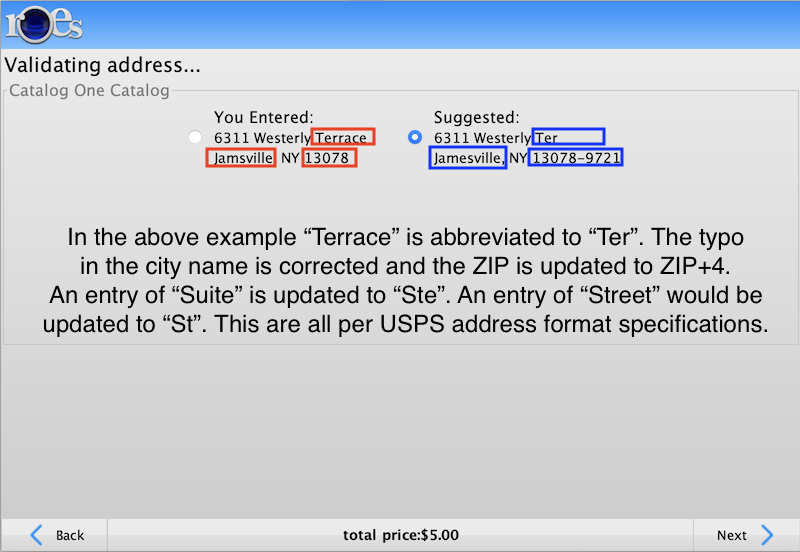
The integrated address validation uses the USPS database to verify and standardize US addresses, providing "rooftop-level" accuracy for sales tax calculations.
The service validates addresses against current USPS data, making corrections to street names, last lines (city, state, ZIP code), and adding ZIP+4 information when available. This ensures the precise address corresponds to the correct tax rate within more than 11,000 US sales tax jurisdictions.
Address validation is disabled by default. Contact SoftWorks support personal to have address validation enabled.